
GoHighLevel Login Process: Free Trial Access + Complete Guide for Agencies, Clients & Teams [2026]
Struggling to log in to GoHighLevel? Thousands of agency owners and digital marketers search for the GoHighLevel login page every single day and many hit the same frustrating problems: forgotten passwords, 2FA confusion, sub-account mix-ups, and browser errors that just won’t go away.
Whether you’re an agency owner, digital marketer, or a business looking to streamline your workflows, the GoHighLevel login page is where your entire journey begins.
From managing leads and building funnels to automating campaigns and handling client communication, everything becomes easier once you sign in.
This guide solves all of that in one place. Whether you need the direct GoHighLevel login link, step-by-step login help for your agency, a fix for a specific login error, or everything about white label portals and free trial access, you’ll find it here without going anywhere else.
Ready to take your business to the next level? Log in now and start using GoHighLevel powerful features! OR do you need any kind of help? Reach out to NexGHL for assistance.
What is GoHighLevel Login?
GoHighLevel (also written as Go High Level or GHL) is an all-in-one CRM, marketing automation, and sales funnel platform built specifically for digital marketing agencies. The GoHighLevel login page is your gateway to managing leads, pipelines, campaigns, funnels, SMS/email automation, websites, and client accounts all under one roof.
Unlike generic CRMs, GoHighLevel is built for agencies that serve multiple clients. The login system has multiple access layers: an agency master login, client sub-account logins, team member logins, and white-label portals where your clients never see the GoHighLevel brand at all.
| Login Type | Who Uses It |
| Agency Login | Agency owner managing all clients |
| Sub-Account Login | Individual client or team member |
| White Label Login | Clients on your branded SaaS portal |
| CRM Login | Users focused on lead/pipeline management |
| Affiliate Login | GHL affiliates tracking referrals |
| Mobile App Login | Field team / on-the-go access |
| Developer Login | API integrations & custom builds |
How to Access the GoHighLevel Login Page
The correct GoHighLevel login page depends on your account type. Here is a breakdown of every login URL you need:
| Account Type | Login URL |
| Standard Agency / User | https://app.gohighlevel.com/ |
| White Label SaaS (Custom Domain) | https://yourbranding.com/login |
| LeadConnector (Rebranded GHL) | https://app.leadconnector.com/login |
| Sub-Account Direct Access | Provided by your agency admin |
Step-by-Step GoHighLevel Login Process
Follow these steps to successfully log in to your GoHighLevel account:
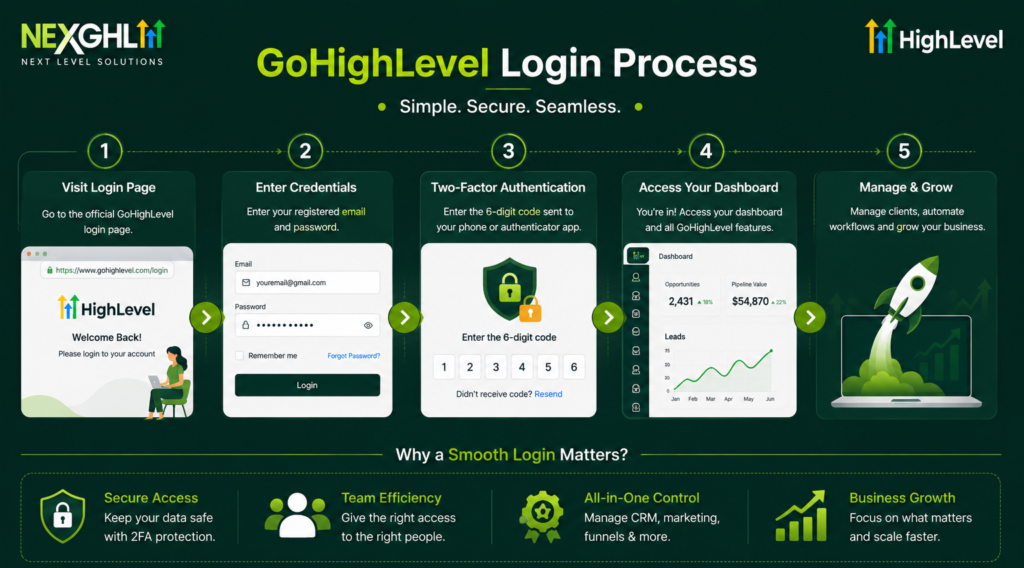
- Step 1: Go to the GoHighLevel Login Page: Open your browser and visit GoHighLevel Login.
- Step 2: Enter the email address associated with your GHL account
- Step 3: Enter your password (case-sensitive)
- Step 4: Click the blue ‘Sign In’ button
- Step 5: If 2FA is enabled, enter the 6-digit verification code from your authenticator app or SMS
- Step 6: You will land on your Agency Dashboard or Sub-Account dashboard depending on your access level
🆓 New User? Start with a Free Trial
GoHighLevel offers a 14-day free trial — no credit card required on entry plans. Visit gohighlevel.com to create your account and get free access to all core features before committing to a paid plan.
How to Enable Two-Factor Authentication (2FA)
To strengthen your account protection, GoHighLevel provides built-in Two-Factor Authentication (2FA). This extra verification step ensures that even if someone manages to obtain your password, they still won’t be able to access your account without the second authentication factor.
Here’s how to set up and use 2FA:
- Enable 2FA in Settings: Log in to your GoHighLevel account and go to the account settings section.
- Choose Your 2FA Method: You can choose to receive a verification code via text or use an authentication app like Google Authenticator.
- Enter the Code: Once set up, every time you log in, you will be prompted to enter the 6-digit code sent to your phone or authentication app.
| 2FA Method | Security Level & Notes |
| SMS / Text Message | Basic — convenient but vulnerable to SIM-swap |
| Google Authenticator | Strong — offline, time-based codes, recommended |
| Authy App | Strong — multi-device backup support |
| Email Code | Moderate — dependent on email account security |
Types of GoHighLevel Login Options
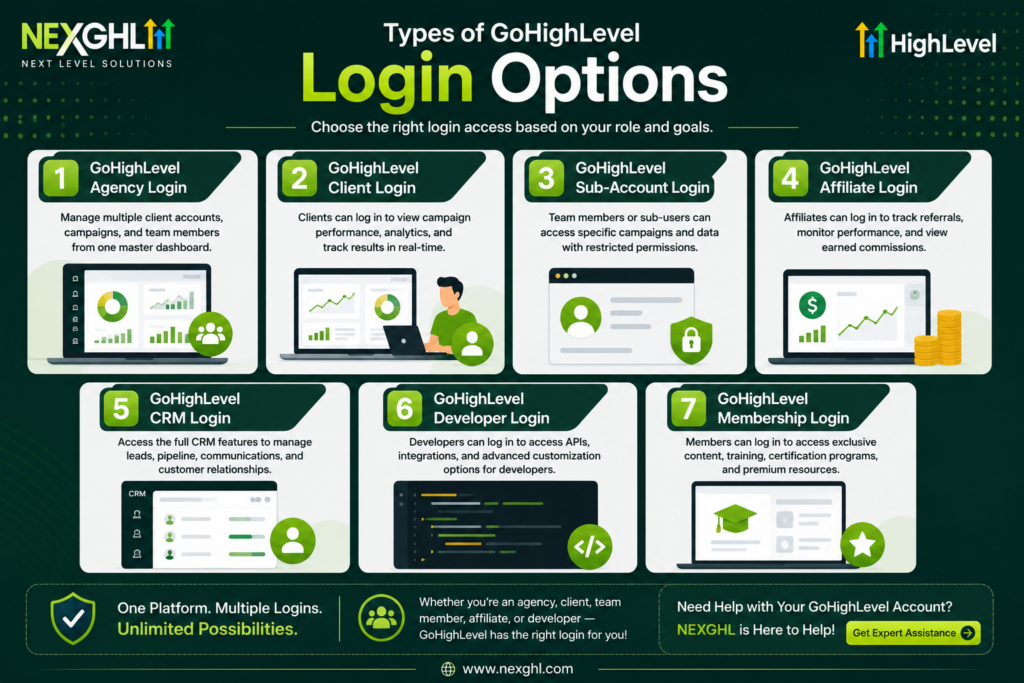
GoHighLevel offers various login options according to different users. These options help streamline access depending on whether you are an agency owner, client, or team member. Here’s a breakdown of the different login types:
1. GoHighLevel Agency Login
If you manage multiple accounts, campaigns, or clients, this login type is designed for you. As an agency user, you’ll have access to a master dashboard that allows you to oversee all client campaigns.
2. GoHighLevel Client Login (Sub-Account Login)
For clients using GoHighLevel, the login process allows you to view the performance of your campaigns, access analytics, and monitor the progress of your marketing efforts.
3. GoHighLevel Sub-Account Login
If you’re part of an agency or a larger team, the sub-account login option allows you to log in to specific campaigns.
This setup is great for team members who only need access to a specific part of your data, making sure privacy stays protected and your workflow stays efficient.
4. GoHighLevel White Label Login
White label login transforms GoHighLevel into a product you sell under your own brand. Your clients log in through your custom portal (e.g., app.youragency.com) and never see the GoHighLevel name at all — you appear as a fully independent SaaS company.
- Custom domain: e.g., app.youragency.com or crm.yourbrand.com
- Custom logo, colors, and branding throughout the entire platform
- Clients see YOUR brand — GoHighLevel is completely invisible
- Requires GoHighLevel SaaS Mode (Agency Pro plan)
5. GoHighLevel CRM Login
This login is specifically for users focused on customer relationship management (CRM). With this login, you can access all CRM features, including managing leads, customer communication, and pipeline tracking.
6. GoHighLevel Developer Login
Developers who work on integrations or customizations will use this login to access API features and advanced integrations.
7. GoHighLevel Membership Login
For users who access special membership areas, exclusive content, or certification programs, the membership login grants access to premium resources and training.
Information Guide on: How to Setup Your GoHighLevel Account? A Stress-Free Guide
GoHighLevel Via Mobile App Login
GoHighLevel mobile app gives agency owners and team members full CRM, conversations, pipeline, and calendar access from any device. Essential for agencies with remote or field teams.
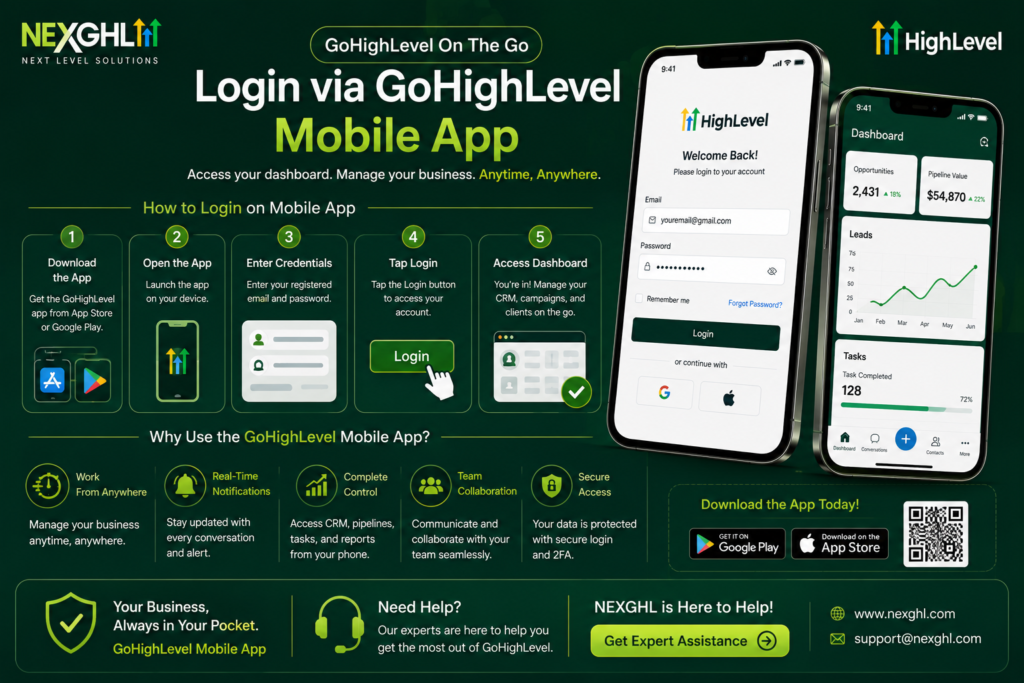
- Download the App: Go to the Apple App Store (for iOS users) or Google Play Store (for Android users) and search for the GoHighLevel app.
- Open the App and Enter Credentials: Once the app is installed, open it and input your GoHighLevel login details.
- Tap “Login”: After entering your email and password, tap the “Login” button to access your account and manage your campaigns from anywhere.
The mobile app is an excellent solution for busy users who need quick access to their data on the go.
Common GoHighLevel Login Issues & Fixes
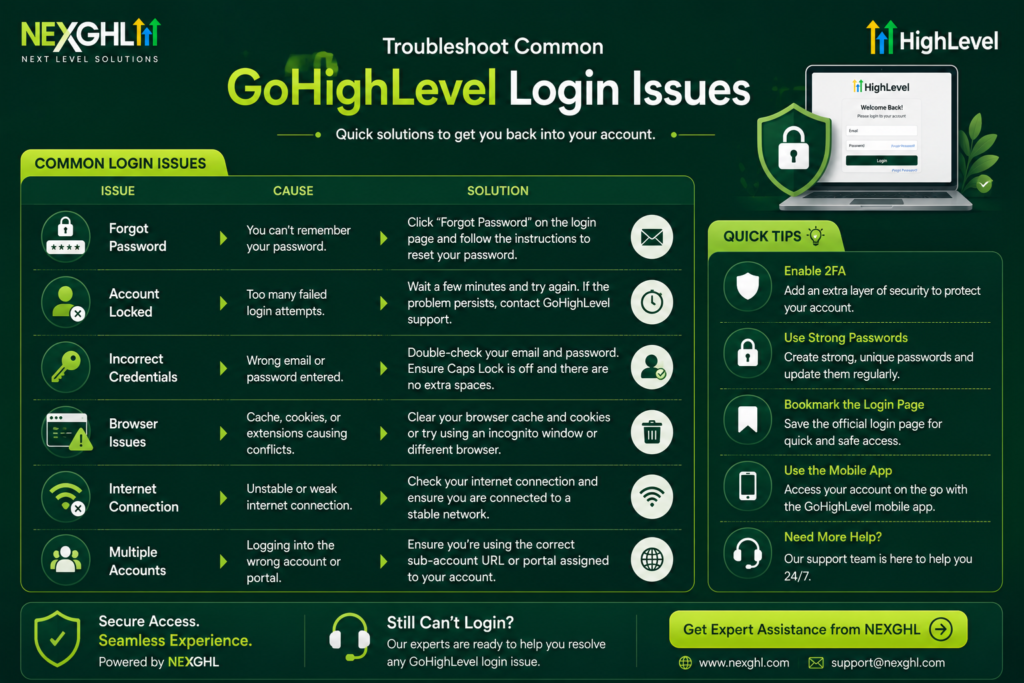
Sometimes, you might encounter issues while trying to log in to GoHighLevel. Below are the most common problems and how to resolve them:
1. Forgotten Password
Click ‘Forgot Password’ on the login page. GoHighLevel sends a reset link to your registered email. Check spam if it doesn’t arrive within 2 minutes. Reset links expire in 60 minutes.
2. Account Locked
After multiple failed login attempts, GoHighLevel may lock your account temporarily. If this happens, wait a few minutes and try again. If the issue persists, contact GoHighLevel support for assistance.
3. Incorrect Credentials
Ensure that you are using the correct email and password associated with your GoHighLevel account. Check for any typos, especially if you are copying and pasting credentials.
Never Miss this One: How to send Emails From Your Domain Through GHL?
4. Browser Compatibility Issues
Sometimes, browser settings or extensions can interfere with your login process. Try clearing your browser cache and cookies or use a different browser to log in.
5. Multiple Accounts
If you are managing multiple accounts (such as agency or client sub-accounts), ensure that you are logging into the correct portal. Double-check your URL and login details.
6. Internet Connection
A weak or unstable internet connection can cause login failures. Ensure your device is connected to a reliable network.
How to Manage Multiple Accounts (Agency and Client)
One of GoHighLevel biggest strengths is multi-client management. Here is how to structure login access so your agency stays organized and your clients stay protected.
1. Agency Dashboard
The GoHighLevel agency login gives you a high-level overview of all your client accounts, allowing you to track campaigns, analyze performance, and make changes in real time.
2. Sub-Account Access
Sub-accounts are ideal for clients or team members who only need access to specific campaigns. You can create a sub-account for each client, giving them tailored access to their respective campaigns while maintaining control at the agency level.
3. Permissions Management
When you add team members to your GoHighLevel account, make sure to assign the appropriate permissions. You can control whether they have access to specific features like CRM, reports, or campaign data.
Optimizing Your GoHighLevel Login Experience
For a smoother, more efficient experience when accessing GoHighLevel, follow these tips:
- Bookmark the Login Page: Save the login page for quicker access.
- Set Up 2FA: Always enable two-factor authentication for enhanced security.
- Use Strong Passwords: Create strong, unique passwords for your account.
- Leverage the Mobile App: Use the GoHighLevel mobile app for on-the-go convenience.
- Regularly Clear Browser Cache: This ensures you’re always working with the most up-to-date version of GoHighLevel.
Final Thoughts
If you’re logging in for the first time or coming back, make sure you’re using the right GoHighLevel login page based on your needs.
If you want to login make sure to be landing on the login landing page URL.
Gohighlevel Page: https://www.gohighlevel.com/
If this guide helped you, share it with your agency team or network. And if you need expert setup help NEXGHL is ready.
Get Expert Help from NEXGHL
Don’t spend hours troubleshooting GoHighLevel setup alone. NEXGHL certified experts handle everything from your first login to a fully running white label SaaS agency.
Frequently Asked Questions (FAQ)
Optimized for Google featured snippets and Position Zero. Each answer is concise and direct.
Q: What is the GoHighLevel login page URL?
The standard GoHighLevel login URL is https://app.gohighlevel.com/login. If your agency uses a white label portal, the login URL will be on your custom domain (e.g., app.youragency.com/login).
Q: Is GoHighLevel login free?
GoHighLevel offers a 14-day free trial with full feature access. You can sign up at gohighlevel.com and log in immediately. After the trial, paid plans start at $97/month for the Starter plan.
Q: How do I reset my GoHighLevel password?
Click ‘Forgot Password’ on the login page, enter your email, and check your inbox for a reset link. The link expires in 60 minutes. Check spam if the email doesn’t arrive or contact support at support.gohighlevel.com.
Q: What is GoHighLevel white label login?
White label login lets agencies offer GoHighLevel’s platform to clients under their own brand name and domain. Clients log in at the agency’s custom URL and see the agency’s branding. GoHighLevel is invisible. Available on the Agency Pro (SaaS Mode) plan.
